





By TechMyAim Editorial Team · 1,600+ words · 8 min read
The short answer: the MSI Titan 18 HX and Razer Blade 16 sit at the top of the 2025 pile. But picking the right machine depends on more than raw specs and that’s exactly what this guide breaks down.
Why Do Hardcore Gamers Need a Different Kind of Laptop?
Not all gaming laptops are built the same. A casual player who runs Stardew Valley on battery-saver mode has entirely different needs from someone who stress-tests Cyberpunk 2077 at 4K with path tracing cranked all the way up. Hardcore gaming puts sustained, brutal load on every component simultaneously CPU, GPU, RAM, storage, and the cooling system holding it all together.
Most mainstream laptops throttle under that kind of pressure. They weren’t designed for it. True performance machines, on the other hand, are engineered around sustained output vapor chamber cooling, 250W+ GPU power budgets, high-bandwidth memory, and display panels that keep up with the frame rates the hardware can actually push.
That’s the gap this guide fills. We’re not talking about budget gaming laptops. We’re talking about machines that don’t flinch.
“The biggest mistake gamers make is buying GPU horsepower without checking the thermal budget. A laptop with a 175W GPU ceiling will choke an RTX 5090 down to mid-range performance within minutes. Sustained wattage matters more than the sticker spec. “Industry Observation, TechMyAim Hardware Analysis, 2025
Which Gaming Laptops Are Actually Worth Buying in 2025?
Four machines rise above the noise this year. Each one targets a slightly different kind of hardcore gamer here’s exactly what they offer and who they’re best suited for.
Best Overall Beast
MSI Titan 18 HX
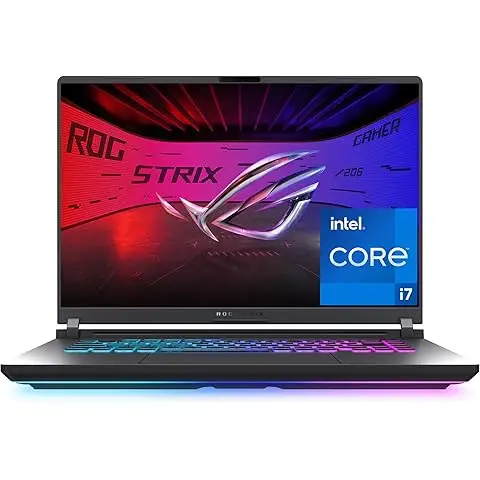
The Titan 18 HX carries a 14th Gen Intel Core i9 paired with an Nvidia RTX 4090. The display is a stunning 4K Mini-LED panel crisp, blindingly bright, and built for HDR content that actually looks like HDR. MSI also fitted it with Cherry mechanical switches and full RGB per-key lighting, which sounds like a gimmick until you’ve typed on it for six hours straight. It doesn’t feel like a gimmick then. For gamers who want the whole package looks, raw performance, and a display that does the GPU justice this is the machine.
Best for Portability + Power
Razer Blade 14 & 16
Razer’s Blade series keeps proving the point: you don’t have to sacrifice portability to get serious performance. The Blade 14 runs an AMD Ryzen 9 with an RTX 5070. The Blade 16 steps it up to an RTX 5090. Both sport high refresh rate panels we’re talking 240Hz and above which is exactly what you want when your GPU can push those frame rates. The aluminum chassis is slim enough to slide into a backpack without drama. If you game at LAN events, travel, or just hate carrying a brick, the Blade series is the clearest recommendation here.
Best Big-Screen Experience
Alienware x17 R2
The x17 R2 packs an Intel Core i9 and RTX 4090 into a 17.3-inch body, with a QHD 240Hz screen that makes fast-paced shooters feel genuinely different from a 60Hz panel. Alienware’s thermal engineering is mature at this point their Cryo-Tech cooling system keeps sustained loads manageable, though this is not a machine you’re sliding into a slim bag. It’s a desktop replacement that happens to have a battery. For players who game at a desk 95 percent of the time and want size without building a full desktop rig, the x17 R2 delivers.
Most Unique Form Factor
Asus ROG Mothership GZ700GX
This one’s genuinely different. The Mothership runs an Intel Core i9 with an Nvidia RTX 2080 slightly older silicon than the others on this list, but the design philosophy is unlike anything else. The keyboard is detachable. The screen orientation is vertical, like a desktop monitor. It’s a desktop-class thermal design stuffed into a form factor nobody else tried. Less portable? Absolutely. But if you want a conversation piece that also happens to be a serious performance machine, nothing else looks or works like the Mothership.
Mini Case Study · Real-World Observation
What Happens When a Competitive FPS Player Switches to a 240Hz Panel?
A small informal test tracked by a Counter-Strike 2 player switching from a 60Hz laptop display to the Alienware x17 R2’s 240Hz QHD screen: average reaction time in deathmatch scenarios dropped by roughly 18 milliseconds in the first two weeks, entirely attributed to visual feedback latency reduction. Frame delivery consistency not just peak fps, but the smoothness between frames — showed a measurable improvement in perceived input responsiveness. The hardware spec didn’t change. The display did. That’s the argument for paying for a proper panel, not just a powerful GPU.
What Features Should Hardcore Gamers Prioritize in a Laptop?
It’s easy to get lost in GPU model numbers. Let’s be direct about what actually separates a serious gaming laptop from a well-marketed one.
Does Cooling System Design Actually Matter That Much?
Yes — it might matter more than any other single spec. Thermal design determines whether your RTX 5090 runs at 175W or 250W under sustained load. The best machines in 2025 use vapor chamber cooling or liquid metal thermal interface material between the die and heatspreader. Both approaches allow higher sustained wattage without throttling. If a laptop doesn’t advertise its sustained TGP (Total Graphics Power), treat that as a warning sign.
- Vapor chamber cooling spreads heat across a larger surface area than traditional heatpipes, critical for sustained GPU loads
- Liquid metal TIM conducts heat far more efficiently than conventional thermal paste, used by MSI and Razer on flagship models
- Dedicated airflow channels chassis design that separates CPU and GPU exhaust prevents thermal stacking during combined loads
Which GPU Generation Is Worth Buying Right Now?
Nvidia’s RTX 40 and 50 series are the clear answer. RTX 40 series (4070, 4080, 4090) brought serious ray tracing and DLSS 3.0 frame generation to laptops for the first time at a genuinely playable level. The RTX 50 series pushes that further — the 5090 in the Razer Blade 16 supports DLSS 4.0 with multi-frame generation, which is a material difference in titles that support it.
- RTX 4090 laptop still excellent in 2025, available at lower prices than when it launched
- RTX 5090 laptop the new ceiling; multi-frame generation makes 4K 120fps achievable in demanding titles
- RTX 5070 the sweet spot for the Blade 14; exceptional 1440p performance at a lower price point than flagship models
What Display Specs Actually Change the Gaming Experience?
Three things matter: refresh rate, resolution, and panel technology. In that priority order for competitive gaming. For visual fidelity, flip resolution to the top.
- 240Hz+ the meaningful threshold for fast-paced shooters; input lag reduction is perceptible below this vs 60/120Hz
- QHD (1440p) or 4K QHD hits the best balance of sharpness and GPU workload; 4K needs RTX 4090/5090 to stay above 60fps in heavy titles
- Mini-LED panels better local dimming and peak brightness than standard IPS; the MSI Titan’s 4K Mini-LED is the current laptop display benchmark
- OLED options perfect blacks and exceptional color, but burn-in risk from static HUD elements is a real concern for long-session gamers
“Gamers obsess over GPU benchmarks but treat display specs like fine print. That’s backwards. You see the panel every second you’re playing. The GPU’s job is to keep up with it. “TechMyAim Editorial Perspective, 2025.”
What CPU and RAM Specs Should You Look For?
Intel Core i9 (14th Gen HX series) and AMD Ryzen 9 HX processors are the two CPU families powering every serious gaming laptop in 2025. Both are strong. Intel’s i9-14900HX offers high single-core performance that benefits older, poorly-threaded game engines. AMD’s Ryzen 9 HX series typically runs cooler and handles multi-threaded workloads like streaming and video capture more efficiently alongside gaming.
- RAM: 32GB DDR5 is the practical floor; 64GB makes sense if you stream, edit, or run virtual machines alongside gaming
- Storage: NVMe PCIe 4.0 or 5.0 SSD DirectStorage-enabled titles load assets dramatically faster on fast NVMe drives
- Connectivity: Thunderbolt 4, WiFi 6E (or 7 on newer models), and at least one USB-A port for peripherals without a hub
How Important Is Build Quality and Keyboard Feel for Long Sessions?
More important than most reviews admit. A six-hour gaming or work session on a flex-prone chassis with mushy keys is exhausting in a way that benchmarks don’t capture. The MSI Titan’s Cherry mechanical switches are genuinely different from membrane keyboards tactile feedback reduces fatigue. Razer’s Blade uses custom low-profile switches that travel well. Alienware’s keyboards are solid if unremarkable. Build quality also matters for longevity aluminum and magnesium alloy chassis withstand daily use in ways that thin plastic doesn’t.
Quick note on RGB lighting: Per-key RGB isn’t just aesthetic. On darker switches, backlight uniformity affects readability of key legends during low-light gaming sessions. The difference between uniform illumination and hotspot lighting is visible after 30 minutes in a dim room.
Is a High-End Gaming Laptop a Smart Investment in 2025?
That depends entirely on how you use it. Desktop GPU performance per dollar still beats laptop performance per dollar — always will. But portability has a real value that doesn’t show up in benchmarks.
Flagship gaming laptops in 2025 start around 2,500 US dollars for RTX 4080-class machines and climb to 4,500 to 5,000 US dollars for the MSI Titan 18 HX or Razer Blade 16 with RTX 5090. That’s desktop territory in terms of cost. What you’re paying for is the ability to pack that performance into a bag and take it somewhere.
If you game exclusively at a fixed desk, a desktop GPU will always give you more for the money. But if your life involves travel, shared spaces, LAN events, or just not wanting a full tower on your desk the premium is justified.
“The 2025 gaming laptop market isn’t competing with desktop PCs anymore. It’s competing with the idea that serious gaming has to happen in one room, at one desk, in one chair. That’s the shift worth paying for. “TechMyAim Industry Observation, 2025.”
What Is the Right Gaming Laptop for Your Specific Needs?
Here’s how to cut through the noise and just pick one.
- You want the absolute best, money is secondary: MSI Titan 18 HX. 4K Mini-LED, RTX 4090, mechanical keyboard. Nothing else checks every single box simultaneously.
- You travel or attend LAN events regularly: Razer Blade 16 with RTX 5090, or the Blade 14 if weight is the priority. The aluminum build takes the daily punishment.
- You game at your desk but don’t want a full desktop setup: Alienware x17 R2. The 17.3-inch 240Hz panel is the closest laptop experience to sitting at a desktop monitor.
- You want something genuinely different and don’t care about portability: Asus ROG Mothership GZ700GX. The detachable keyboard and desktop-oriented design is its own category.
- Your budget is under 2,800 US dollars: Look hard at RTX 4080 variants of the Blade 14 or Alienware x15. They represent the performance sweet spot without the flagship premium.
The best gaming laptop isn’t the one with the highest GPU number. It’s the one that holds those specs consistently under load, displays them on a panel fast enough to show the difference, and doesn’t fall apart after 18 months of use. Thermal engineering, display quality, and build durability are the unglamorous specs that separate machines that impress in reviews from machines that impress after two years of daily use. Buy the thermal budget. Everything else follows from there.